
Create Projects with JustDecompile
The most requested feature on UserVoice for JustDecompile was the ability to create a Visual Studio project from an assembly, and the latest version gives you that capability. This is useful for exporting lost projects or obtaining multiple classes without the need to copy and paste code.
Let’s take a look at how it works. Open JustDecompile.
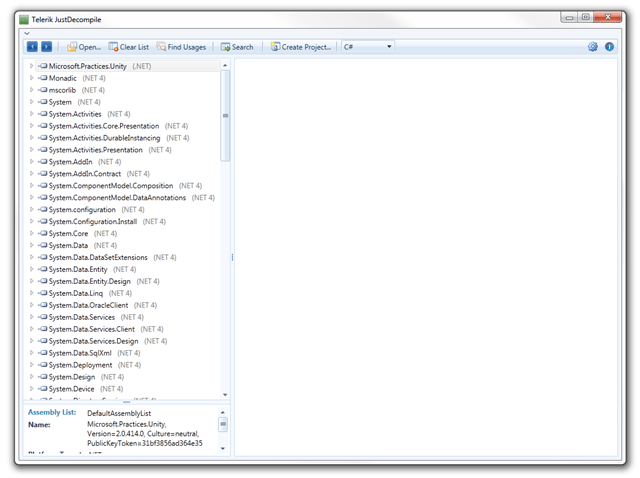
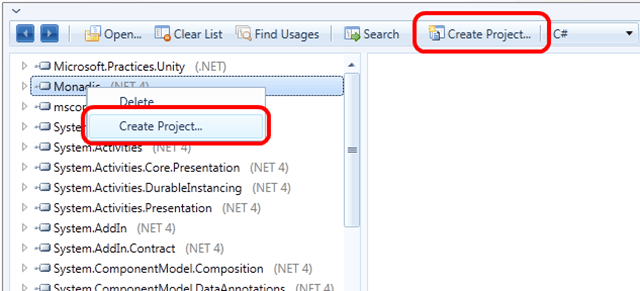
Select the assembly you’re interested in. You can use the Create Project feature in one of two ways: the button on the menu bar or by right-clicking an assembly.
You will then need to select a folder in which to save the project. A dialog will appear and list the files as they’re exported.
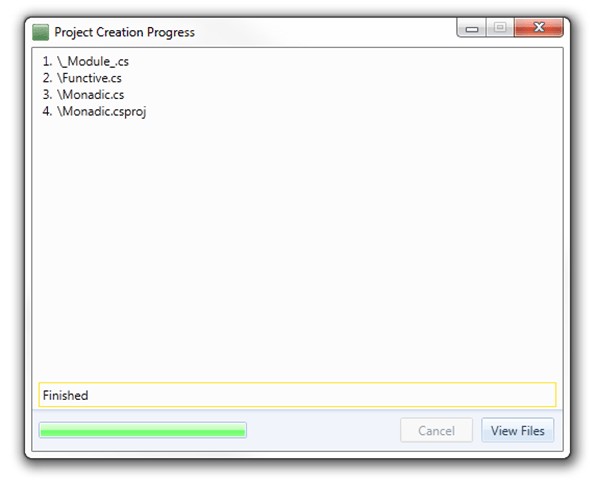
The files are saved to subfolders based on namespace. This is necessary to prevent naming conflicts, and it provides a better arrangement in Solution Explorer for finding files.
Issues with decompiling files will be listed in the dialog. I chose a small project that causes issues for every decompiler. JustDecompile exported everything.
JustDecompile does an excellent job on decompiling the code, but it may require some cleanup depending on the code’s complexity. _Module.cs_ should be removed, and I found a few compiler generated classes hanging around in the project. One thing is clear: had this been a lost project, JustDecompile would have saved me a ton of work.
This product has come a long way since its original beta release several months ago, and it keeps getting better with each iteration.

Chris Eargle
Chris Eargle is a Microsoft C# MVP with over a decade of experience designing and developing enterprise applications, and he runs the local .NET User Group: the Columbia Enterprise Developers Guild. He is a frequent guest of conferences and community events promoting best practices and new technologies. Chris is a native Carolinian; his family settled the Dutch Form region of South Carolina in 1752. He currently resides in Columbia with his wife, Binyue, his dog, Laika, and his three cats: Meeko, Tigger, and Sookie. Amazingly, they all get along... except for Meeko, who is by no means meek.
Comments
All articles
Topics
Latest Stories
in Your Inbox
Subscribe to be the first to get our expert-written articles and tutorials for developers!
All fields are required